Monday, September 3, 2012
Video: 21st-Century Learning

Use an RSS Reader to Help Build Your PLN
One of the best ways for you to add to your personal learning network (PLN) is by reading blogs (like this one). To make this easier and more convenient, there are RSS Readers like Google Reader. An RSS reader allows you to subscribe to a blog or website and be notified whenever something new is posted. That way you don't have to go searching 20 different websites every day just to check if there's a new article.
 To start with Google Reader, click on "More" in your black bar at the top of the screen when you're in Gmail or you Calendar. A menu will appear, and you should select "Reader". Then you'll want to find sites to which you want to subscribe. Any blog (or other site) that has this icon has an RSS feed and you can subscribe to it, usually by clicking on the icon. For this blog, the RSS icon is the bottom one on the black bar on the right of the screen.
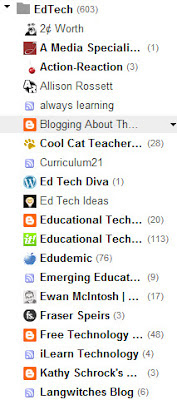 When you subscribe to a blog by RSS, Google Reader shows a list of your subscriptions on the left-hand side of the page. (The list here shows some of the educational technology blogs to which I subscribe.) Blogs that are listed in bold have new items that I haven't read yet; the number in parentheses tells me how many unread items. Most items you can read from within Google Reader, without having to go to the actual website itself; sometimes, though, formatting gets mixed up. You can always go to the actual post by clicking on the title in Google Reader.
Blogs and Twitter are two very useful ways to build your PLN. The more you read and comment, the more ideas you get, and the more effective of a teacher you become! Give it a try!
To start with Google Reader, click on "More" in your black bar at the top of the screen when you're in Gmail or you Calendar. A menu will appear, and you should select "Reader". Then you'll want to find sites to which you want to subscribe. Any blog (or other site) that has this icon has an RSS feed and you can subscribe to it, usually by clicking on the icon. For this blog, the RSS icon is the bottom one on the black bar on the right of the screen.
Blogs and Twitter are two very useful ways to build your PLN. The more you read and comment, the more ideas you get, and the more effective of a teacher you become! Give it a try!
Wednesday, August 29, 2012
Word Cloud
Just for fun, here's a word cloud for this blog so far. This was created in Wordle. I'm quite happy that "students" is the one of the biggest (and therefore most used) words.


Simple Voice Recording
It doesn't take much to record your voice while you are presenting to students. If you have a smartphone, you have a recorder. On my Android phone, I downloaded Easy Voice Recorder (free, or Pro version for $4). You can use this program to record notes for yourself any time with the built-in microphone. With a phone headset, you can record yourself while you are explaining something in your classroom, then upload that file to your class website so students can listen to you again (or for the first time). For iOS, try SuperNote (free or $2 paid version), which does simple voice recording along with text or picture notes. You can also use Evernote for voice recording, on either Android or iOS. Think about how many times you explain something in your classroom. Then think about explaining it once and letting kids listen to it over and over and over and over .........
Sunday, August 26, 2012
Free and Fair-Use Photos and Soundtracks
The September/October issue of Learning and Leading with Technology has an article by Keith Ferrell that gives four resources that students can use to find free and fair-use photos:
Not everything on these sites is royalty-free, so make sure students are using advanced searches to find noncommercial or Creative Commons images.
The article also references a site (www.soundzabound.com) that students can use to download royalty-free soundtracks. Try these out the next time your students are putting together a presentation.
Friday, August 10, 2012
Twitter hashtag for SDUHSD
If you'd like to get started using Twitter (and I recommend it), here's an easy way to do it. Sign up at www.twitter.com, and enter "#SDUHSDtech" in the search box. We'll use that hashtag for discussion specific to our district this year. You don't have to follow anyone if you don't want, but you can follow me (@kfairchild6) if you do. This is a simple way to get your feet wet, and once you're used to Twitter, you can explore more. Remember, though, that you should consider everything you share as public: there's nothing private on Twitter.
Thursday, August 9, 2012
Edmodo - great resource to connect with teachers everywhere!
Edmodo is a great resource to connect with other teachers on a varity of topics.
Join our Flipped Classroom community. Here is the group code for the flipped classroom: 0ywjwj
Go to www.edmodo.com and sign up for FREE.
Go to www.edmodo.com and sign up for FREE.
Subscribe to:
Posts (Atom)