Wednesday, March 27, 2013

Did you forget your password?


Here are a few programs that can help:

  • The one I use is called RoboForm (www.roboform.com).  It is installed in your browser and saves logins and passwords for you.  It works on any computer, tablet, or smartphone, with any browser.  It can generate extremely difficult passwords for you if you want (like krClD7yK).  You can use it locally (on just one computer) for complete safety, since it never transmits your passwords beyond your computer.  Alternatively, you can use Roboform Everywhere, so you can access your passwords from multiple computers.  It costs $30 for the browser plugin and $10/yr for Roboform Everywhere.
  • 1Password (agilebits.com/onepassword).  Like Roboform, this program has versions for all operating systems, though the Android and Windows Phone versions are still in beta.  Unlike Roboform, you have to purchase the versions separately.  A Windows or Mac version costs $50; the iPhone/iPad version costs $17.  1Password does not have its own synchronization; instead it makes use of DropBox to share your information between devices.
  • LastPass (lastpass.com).  This is the cheapest of the services, and one of the most popular.  The free version works on Windows or Mac computers and keeps your information shared between desktop or laptop computers.  If you want to access your logins and passwords on a mobile phone or tablet, you'll have to pay $12/year for their Premium service.

Thursday, March 21, 2013

Linkapalooza

Links I've recently gathered, many of them from CUE 2013:

Notes from CUE 2013, Friday 15 March

Keynote: Sir Ken Robinson

Sir Ken gave a very entertaining talk, reiterating much of what had been previously expressed by Catlin Tucker.  What I thought was salient about his keynote was his reminder to focus on preparing students for an unknown future. We don't know what the social, economic, or technological circumstances will be when our students are adults; the best thing we can do is to prepare them with skills to adjust to change.

After the keynote, I spent some time in the exhibit hall; I'll write about that in the next post.

Edtech Costs

Andrew Schwab has been both an IT director and a classroom teacher, so his presentation on "hidden" educational technology costs included both perspectives.  He examined not only the up-front costs of desktops, laptops, netbooks, and tablets, but also the ongoing costs of support and maintenance.

Is BYOD a good idea for my school?

This was the best session I attended on Friday.  As we begin to think about expanding Bring-Your-Own-Device in our district, I was looking for sessions about implementing BYOD.  Dennis Grice teaches at a private school that requires students to bring an internet-enabled device.  He went through several conditions that he thought necessary for a successful BYOD, including cloud-based tools; solid wireless connections; training for teachers, students, and parents; and clearly stated technical requirements for student devices.  We are well situated for all of those; not everything is complete, but we're working on all of them.  Dennis's presentation is available online here.


Saturday, March 16, 2013

Highest Quality Online Chem Text Ever

I finally hit the jackpot with the highest quality online chem text I've seen.

http://preparatorychemistry.com/default.htm

This site has text, animations, tutorials, glossary quizzes and powerpoints.

The material is outstanding in quality and quantity.

It is capable of being used standalone as a text for a college prep level course or being broken up and utilized in an existing course.

Thursday, March 14, 2013

Notes from CUE 2013, Thursday 14 March

First session: Torrey Trust on building and using Personal Learning Networks (PLNs)


Torrey, as many of you know, is Jerry Trust's daughter, and was a graduate of LCC and a student of mine.  She is now a PhD student at UCSB in educational technology, studying the social dynamics of how teachers learn.  (Short version, according to her: nobody knows.)  Torrey presented about the different types of resources available to construct PLNs, about the types of roles that people take on in social networks, ideas for moving teachers from lurkers to participants, and about recommendations for different tools to use.  She recommended starting with Google Reader as an RSS aggregator, and I agreed completely, except for the ugly fact that just yesterday Google announced that they are going to pull the plug on Reader on July 1.  Torrey looked distraught when she heard that news.  So was I, frankly.

My big question when thinking about this topic was, "How do we get reluctant teachers to start?"  Most of the time, when I've convinced teachers to jump in, they see the value of learning from a PLN.  The big hurdle is convincing them that it is valuable enough to even start.  One idea I have is that we should stop calling it "social" media.  The label "social media" implies fluff and timewasting, and most teachers do not want to be "social" with their students, and rightly so.  But what I think many teachers don't understand is the professional connections that can be made through Twitter, Edmodo, or other community tools.

Torrey's website is edpln.wikispaces.com .

Second session: Technology needs for the Common Core


This group of three teachers from a virtual school in Temecula had a fantastic presentation addressing the implementation of the Common Core State Standards and the implications of that for teaching 21st-century skills with technology.  Their bottom line take-away message was that the CCSS, if implemented well, will automatically address 21st-century skills, and will require that we infuse educational technology into instruction in order to be effective.  Their prezi hit all the right notes, and afterwards I asked if I could borrow it as an outline to bring back to our district.  I suspect that very soon I (or someone else) will have to give this very presentation to our district teachers, as we prepare ourselves for transitioning to CCSS.

Their discussion site is techcommoncorecue13.blogspot.com .

Third session: Rushton Hurley on inspiring staff


I had never heard of Rushton Hurley before today, but that is clearly my loss.  This guy was dynamic, entertaining, thoughtful, passionate, and insightful.  Every few minutes I thought to myself, "I need to remember that to bring it back to our teachers."  After several of those thoughts, I revised it, and instead thought, "I need to bring him back to talk to our teachers."  I can't do this inspiring talk justice, but I will mention that he had five lessons to remember when trying to implement change among reluctant or resistant teachers.

Hurley works at Next Vista for Learning, an educational consulting firm.  Their website is www.nextvista.org .

Keynote:  Catlin Tucker


Catlin Tucker is a high school English teacher who has made herself a leader in the educational technology field simply by being dissatisfied with the way she was previously teaching.  She described her own story of being a traditional English teacher, and failing to engage students in thoughtful discussions.  Her presentation detailed her journey through the "stages of grieving" until she finally decided to try engaging students through technology.  Her keynote was entertaining and motivating, and I suspect that her personal story would resonate with many teachers I know personally.  If and when the video is posted on the CUE website, I will put a link to it here.  UPDATE:  Here is the link to the keynote video on YouTube.

Tuesday, March 12, 2013

The Physics Hypertextbook

http://physics.info/


I found this book in my neverending quest.  Unfortunately it is incomplete.  The sections that are there are a pretty good quality physics text.  It lacks links to video, tutorials, etc. that can help reinforce understanding but the text that is there is good.  Of interest to some is excerpts from the original work by Newton, Carnot etc.

Thursday, March 7, 2013

Language Shapes the Way We Think

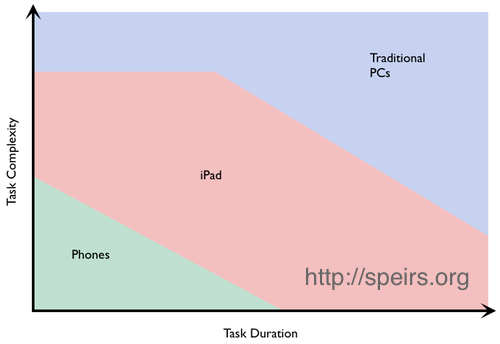
Fraser Speirs has developed a nice framework to use in thinking about what type of device is the best for a particular task.  While the traditional dichotomy is one-dimensional (consuming information vs creating information), Speirs proposes that we think about a two-axis chart, with task complexity on one axis and task duration on the other.

While I think this is a useful way to think about "the right device for the task", I have one major issue with this diagram.  Why is the middle zone labeled "iPad" rather than "tablet"?  The lower one is not labeled "iPhones".  The upper one is not labeled "iMacs".  The use of "iPad" as a generic name for a tablet device is (a) a triumph of Apple's marketing and (b) a hurdle for our district to overcome.  As we investigate the best devices for district technology to purchase for teachers and students, more and more we come to Chromebooks and Android tablets, only to hear from teachers that they want "iPads".  Some teachers can give very good justifications for why they want an iPad specifically; others are simply using the term as a shortcut for "tablet".  Diagrams like the one above contribute to the confusion.

I'm not trying to disparage iPads in any way.  I've just never had anyone be able to explain to me why a tablet from Apple is a better educational device in all situations than a tablet from Samsung, for example.