Tuesday, October 21, 2014

Reflections from EdCamp San Diego 2014

These are my random reflections from EdCamp San Diego 2014. They're very much from my own perspective as an organizer, not as an attendee. I'm hoping they will be useful to organizers of other EdCamps.
  • They started coming about 7:45. Up until that time, I still had the "pre-party jitters": What if nobody comes? By 7:50, I didn't have to worry about that any more; instead I had to go find more people to work the registration desk.
  • This was our second EdCamp and easier by FAR to put together than the first one. We probably did about a quarter of the work this year as compared to the previous year. Which makes sense, since we were really feeling our way along last year, with no one in the group who had put on an EdCamp before. By this year, we were seasoned veterans. We had set up a Google+ community to organize our resources and discussions. We had a total of two Hangouts to discuss planning; most of the discussion happened in the G+ community.
  • We also had control of our own website this year, which saved some work. Jo-Ann had experience with Eventbrite, as well, making that part easier. And we were more confident about attendance (or lack thereof) than we were last year. In 2013, we were very conservative about the signup page, because we did not want to exceed the capacity of our venue. This year, we knew that we wouldn't get more than 50% attendance (if even that), so we just put out 300 invites at the beginning and didn't worry about it. All 300 were taken by a few days before the event; we ended up with about 130 people actually attending.
  • I would very much like to know how many people who attended this year had also been there last year. I think we should include that in our pre-survey in the future.
  • Our session board went well. I liked having two colors of cards, one for "What I want to learn" and one for "What I want to lead". How I think we handle it next year is to NOT put the "learn" cards on the session board, but instead put them off to the side. The idea would be that people could read the "learn" cards, pick what they might be able to "lead", and then put that on the board. By putting the "learn" cards on the board directly, it was a little confusing, and I think may have discouraged some people from putting their own sessions up, as the board appeared to fill up.
  • I didn't get to see the introductory session, but I heard that Jo-Ann and Jeff did a great job. This is the second year I've missed the intro session, because I've been entering session descriptions into the website and mobile app so they're ready for session 1. I'd love to think of a better way to do that, but haven't been able to come up with one yet.
  • During session 1, I finished entering session descriptions into the mobile app while Leigh Murrell helped me out by doing the web side of the task. Then I dropped in to a few sessions and took some pictures. Everything seemed to be going well, and I noticed what seemed like a better balance in session turnout than last year. In 2013, it seemed like there were some sessions that were packed, and others with only 2 or 3 people in them. I didn't see anything like that this year; most sessions (that I saw) were well attended but not overcrowded.
  • In session 2, I spent most of my time in the ToSAs brainstorming session. I went to that room only intending to stay for a few minutes, but got drawn in to the discussion and didn't leave until I had to go check on the lunch trucks. It was really interesting to hear different districts' models for ToSAs, and the various responsibilities. I offered an invite for our ToSAs Unite Google+ community before I had to leave.
  • Lunch trucks should have been a great idea. Apparently, it was more difficult than it needed to be. Joe Hartmann was our lunch truck wrangler, and he's already called "not it!" for next year. We were concerned about timing: could everyone get their food in the hour that we had set aside for lunch? To help with that, we tried to take "pre-orders": when you check in, look at the menu and write down what you want on an index card. According to the lunch truck workers, that didn't really help at all. In any case, there did not seem to be any problem with timing. We had 3 trucks to feed 130 attendees, some of whom either brought their own lunch or had already left, so let's say around 100 people purchasing from trucks. I get the sense that we're kind of on the low end of the numbers these trucks want in order to make it worth their time to show up. Maybe next year we only get two trucks? Or maybe we go back to the "donated pizza" model. We'll have to see.
  • In session 3, Krystle Miller and I led a session on professional development. It turned out to be more popular than I thought it would be (probably 25 people or so), and an easier topic to discuss than I was afraid of. Krystle had said that the ideal EdCamp session leader introduces the topic and then doesn't talk at all for the rest of the session. That's exactly what happened in our session, so I think we have to count it as a success!
  • For the last session, I was in the Board Room helping Jo-Ann and Krystle get ready for the prize giveaways. Jo-Ann had suggested (based on seeing it at a different EdCamp) that we do the raffle tickets differently than we had in the past. Instead of one big bin that everyone puts their ticket in, getting selected for a random prize, we had individual containers labeled for each prize. Attendees got to pick which prize they wanted and put their ticket in that bin. That way, no one would get a prize they really didn't want. It seemed to work very well, and quickly, which is important for the closing session at an EdCamp.
I absolutely loved getting to see my friends and colleagues from other districts, as well as getting to meet many of them face-to-face for the first time. Every time I go to an EdCamp, whether or not I'm one of the organizers, I meet more great educators, get more great ideas, and become a better professional. Thanks to everyone for helping to make EdCamp San Diego 2014 a success!

UPDATE Oct 24: Apparently, our attendance was closer to 150 than 130. Great to hear!

Sunday, October 19, 2014

Fifteen Things You Should Know But Maybe You Don't

  1. Students do not have email accounts through their district accounts. Their login name (like "smithj1234@my.sduhsd.net") looks like an email address, but we do not have email enabled for students. (This may change in the near future; watch my weekly emails for information if it does.)
  2. Blogger and YouTube are owned by Google, and therefore are part of our Google Apps. Your district email account lets you sign in to Blogger and YouTube as well.
  3. Nothing will import grades into Aeries. When you find yourself asking "I wonder if this program can import grades into Aeries..." just stop. The answer is no. Sorry.
  4. You should be using the "SDUHSD" wireless access. If you're using "guest_SDUHSD" or "School", switch over. You'll be glad you did.
  5. Every Emily Dickinson poem can be sung to the tune of "Yellow Rose of Texas."
  6. You can access files in your H: drive remotely by going to files.sduhsd.net. If you're on your own computer, try "Advanced Mode" first. If that doesn't work, or if you're on a shared computer, use "Basic Mode".
  7. You can save any type of file in Google Drive, not just documents, spreadsheets, or presentations. Just "Upload" a file (or click "New" if you're in the new Google Drive).
  8. Wait, there's a "new" Google Drive? Yep. Click on the "gearbox" in the upper right of the screen. You should see a menu choice that says something like "Try the New Drive". Soon it won't be a choice, so the sooner you get used to it, the better.
  9. You can drag files from your computer to Google Drive instead of clicking "Upload". You can also drag and drop files to different folders within Google Drive.
  10. Student Google accounts are wiped out every summer, so if there's something students want to save, they need to move it to a personal account. (This is another thing that may change in the near future because of changes to the way Google handles accounts.)
  11. iPads are not the only tablets that exist. Look into Android tablets, and you just might find something you like, for much less.
  12. You can use the Windows Logo key on your keyboard for shortcuts:
    • Windows Logo + P : switch projector display
    • Windows Logo + right arrow : move the open window to the right half of the screen
    • Windows Logo + left arrow : move the open window to the left half of the screen
    • Windows Logo + L : locks your computer and requires your password to open it again; useful if you're using your computer in a classroom of students
  13. In Chrome, you can use an "Incognito" window to let someone else log in to their email or Google Drive temporarily. From the Chrome menu (the three stacked bars in the upper right), select "New Incognito Window". Then the second person can log in without you having to log out. This can be useful if a student wants to load a class presentation from their Drive on your computer, or if you're working with a colleague who needs to use your computer for a few minutes.
  14. If you type "1-minute timer" into a Google Search box, guess what you'll get. Try it out.
  15. Google Docs has a "Research" option from the "Tools" menu. If you highlight a word or phrase, then select "Research", a side panel will open up with a search for that term. You can then insert links and citations directly into your document from the panel.

Saturday, October 4, 2014

In Its Most Basic Form, Everything is Simple

In an otherwise unobjectionable column about the difficulties facing the current and any future superintendent of Los Angeles Unified School District, columnist Steve Lopez opens with perhaps the most ridiculous statement about education that I have ever read.
In its most basic form, the idea is pretty simple. The bell rings, students file into class, and teachers share knowledge and tap into natural curiosity.
Well, sure, if you want to be ultra-reductionist about it, everything is simple. Let's try some others:
In its most basic form, the idea is pretty simple. The patient is wheeled into the room, you cut into the chest, fix the heart, and close it up.
In its most basic form, the idea is pretty simple. The judge enters the courtroom, you tell the jury why the defendant is guilty, then everyone goes home.
In its most basic form, the idea is pretty simple. The astronauts enter the rocket, someone pushes "Fire", and the rocket lands on the moon.
In its most basic form, the idea is pretty simple. You sit down at a computer, write an intelligent column, and give it to your editor.
Hey, this is easier than I thought! I don't know why I've ever worried about anything!


Friday, September 19, 2014

To "E" or Not To "E" - Teens and Reading

Adrienne St. George is our district's Media Center Specialist. She contributes this guest post on teens and reading, although she would like to state for the record that she had nothing to do with the terrible headline of this post. You can contact her at adrienne.stgeorge@sduhsd.net.


Teens are reading more than ever!!! No, that is not a line from a science fiction story; that is a very current consensus by reputable research groups and interested critics.

Teens' reading efforts match/exceed adult levels:
16 – 29 age groups actually read MORE than the 30+ age group. A lot of this is due to reading that is necessary for school but personal reading numbers are equal for both age groups which is awesome news! Teens/young adults will read on any device available while the 30+ age group prefers an e-reader or print.

Teens/adults use libraries differently than adults. Statistics show that they actually use libraries MORE than adults. However, they use them for book recommendations, getting help with apps and digital questions, e-books, online information, and online classes. The general consensus of teens/young adults is that all library services should be online. When asked about the future of public libraries, teens and young adults don’t think that libraries, as a physical entity, will have a strong impact on their community. They DO, however, want to be able to access all of the public library digital resources.

When asked about a preference in reading print or a digital format, youngsters (0 -8) tend to lean to print, as that is what they are familiar with when parents read to them. Parents are in full support of print for the 0 – 8 age groups for reading because that is what they grew up with and are familiar with. From age 10 on, most parents are not as concerned with the version of a book; they just want their kids to read! Some of the reasons given by parents for the huge rise in digital reading in teens since 2011:
  • I read e-books and that’s what my kids see. If I am modeling this behavior, I need to allow them the same option.
  • E-books are available right away. Being able to satisfy an interest in a book right away is important.
  • There is a wide selection of e-books.
  • E-readers are affordable, some are even free.
  • E-books are easy for long travel, on the way to school or in bed.
  • If an e-book will get my kids to read, then they can read an e-book!
The bottom line is that reading, as a whole, is on the rise. Statistics show that e-books have been instrumental in saving the publishing industry... just like Burton pretty much saved the skiing industry with the very “nasty” snowboard! (Sorry I can’t back that up officially but who cares as long as there is a mountain covered with sierra cement to ride?!)  Many say that e-books have contributed to the resurrection of reading, but who cares as long as everyone is enjoying a book in whatever format they prefer?


Book Revenues are Up, by Kelsey McKinney on June 27, 2014, Vox Media
Children, Teens and Reading, Common Sense Media Research Brief, 2014
E-books vs Print: What Parents Need to Know, by Jenny Deam, Parent and Child/Scholastic, 2014
E-book Revolution: We’re Reading More than Ever!, by Husna Haq, Christian Science Monitor, April, 2012
Zero to Eight, Children’s Media Use in America 2013, Common Sense Media Research

Pew Reports:
A Snapshot of Reading in America in 2013
Digital Age Reading, Writing, Research
E-reading Rises in 2014
The Rise of E-reading

Teens, Tech, and Trends

Adrienne St. George is our district's Media Center Specialist. She contributes this guest post on teens and technology. You can contact her at adrienne.stgeorge@sduhsd.net.


Technology is NOT going away! That’s not a news flash, is it? The real news is that as the use and acceptance of technology expands, so do the skills of the users, especially those in the 16 – 29 age groups.

Recent reports from PEW, Common Sense Media, and other research centers, show that the use of technology as a whole is increasing dramatically from ages 0 – 60+ with very encouraging trends. The surges of use and skill vary for different age groups and for different end goals.

With the focus on teens and young adults, the research results are amazing. Referred to as millennials, access to media devices for this group has exploded in the past 2 - 3 years. Usage of media devices has more than doubled in that time. Average time of use on a device has tripled in that same time frame. Traditional screen media such as TV, DVD, video games has decreased significantly. TV is still a dominant venue but is now viewed through a DVR, is streamed or viewed from “on demand”. Access to devices is becoming more equitable to all socioeconomic groups. Smartphones are the devices that are used the most.

Why a mobile device? Why a smart phone? Reasons given to researchers:
  • Always with us 
  • Instant information and accessibility anytime/anywhere 
  • Fingertip action 
  • Timely info 
  • Location sensitive 
  • Instant feedback 
  • Ability to create our own info and share 
Summary of research:

Teens live in a different information ecosystem:
“There is no playbook for this new environment” (13 Things to know about Teens and Technology, Pew Project, July 23, 2014.) Teens are not aliens but they are different because they are tied to technology. Technology saturates their lives. Teens are becoming a network of information. Information is another skin…natural, ubiquitous, portable, immediate, timeless, participatory, connected and social. More than 95% of all surveyed have broadband at home, more than 70% have access to the Internet on a mobile device, 78% at least have a cell phone (close to 50% have smartphones), 81% use social networking. End result: data and info is a third skin…it is just normal.

Teens live in a different learning ecosystem:
The surveyed College Board and NWP teachers agreed that although technologies are creating a somewhat distracted generation, the internet and digital tools have had a very positive impact on student research. These same teachers strongly believe that the Internet gives students a much wider range of resources than traditional resources. Students know how to access the Internet, use search engines and find information easily. They all agree that while students are very self-sufficient researchers, they believe that a lot of the information found is overwhelming and difficult for students to understand. However, they believe that this is a common problem with traditional research as well. Their main concern for students is the inability to discern bias and validity. Traditional resources were usually considered “pre-validated”. Now students must learn how to validate sources themselves. This is where teachers come in. The surveyed teachers strongly believe that digital literacy needs to be incorporated in daily lesson plans. These teachers stated that exposing students to and teaching them how to use digital resources other than the top three used (Google, Wikipedia and YouTube) would expand research skills, learning and knowledge to even higher levels.

Learning should be a process, rather than an assignment. Teens/young adults create knowledge, rather than receive knowledge. Knowledge is interactive, rather than transmitted in static structures. Learning is active with the learner managing his/her own learning process, rather than passive with the learner just listening and watching.

Overall consensus:
Teens/young adults are wired differently and lead very functional hyper-connected lives. Teens are able to handle multitasking seamlessly. Adults claim multitasking skills, yet they are aware of the different tasks they try to accomplish simultaneously, while it is effortlessly integrated in millennials. Multitasking for adults is clunky and obvious; multitasking for the under 30 age group, is fluid and natural.

The majority of survey participants strongly predict that the future, as soon as 2020, is positive for millennials. Millennials will be able to problem solve quickly and efficiently through cooperative work; they will be able to effectively search for information online, discern the quality and veracity, then communicate the findings; they will be able to synthesize and collect details from many sources into a final suggestion/solution; they will have the ability to distinguish between “noise” and the real information in forever growing amounts of data.

I've always been fascinated by what teens/young adults are capable of doing with phones, with tablets, with all of their devices for school and for fun. Teens today are bright and savvy; they want to be challenged. They want to try to do everything on their devices especially if people tell them it is not possible. It is so nice to hear clear optimism from so many reliable sources that teens really are capable of using technology successfully for learning and probably in ways adults never imagined.


More Teens Use Smart Phones to get Online, eSchool News, 3, 2013
Zero to Eight, Children’s Media Use in America 2013, Common Sense Media Research

Pew Reports:
5 Media Spaces Where People Live
Digital Age Reading, Writing, Research
Teens and Libraries in Today’s Digital World
13 Things to Know about Teens and Technology
Teens and Technology 2013


Monday, September 8, 2014

Ditch the Presentation Myths

Cross-posted at http://www.graphite.org/blog/ditch-the-presentation-myths

We’ve all been there. Assigning the students a project and class presentation seemed like a good idea at the time. Now you’re a third of the way through listening to the students, and you’ve seen enough bad Powerpoint and heard enough monotone reading of notes to last a lifetime. “Never again,” you say to yourself. “Next year, I’m assigning something different.”

I’ve found that many teachers still hold ideas about student presentations that are not true. Here are some myths for you to bust when thinking about your next “presentation” assignment:

1. Presentations take students a long time.


This may have been true in the days of 3-fold poster board and glue sticks. Today, however, even if you give students 3 weeks to create a presentation, they are likely to do it the night before it is due. Most students with access to computers or tablets can create presentations in about an hour. Such is the power of Google Slides, Prezi, or Haiku Deck.

I recently ran a workshop for principals and assistant principals in our district. As part of that, I asked them to research models of student-centered classrooms and create a presentation for their colleagues. They had 45 minutes in which to do this, and I asked them to use a presentation tool they were unfamiliar with. Every team was able to produce something. If non-tech-savvy-administrators can deliver in 45 minutes, surely our students can do likewise.

Now, obviously, you probably don’t want to have every presentation be a quick-and-dirty assignment like that. But don’t think that assigning a presentation necessarily has to be a long-term project for students.

2. Students have to stand and deliver their presentations.


“Well, OK, maybe students don’t need that long to create their presentations. But it still takes a huge amount of class time for each group to get up and deliver their presentation, right? I mean, even a 5-minute presentation, times 10 groups in a class, that’s nearly an hour of class, right?”

It doesn’t have to be. Sure, there will be times when you want students to present orally in front of groups of people. But that doesn’t mean it’s a requirement any time students create a presentation. Students could use tools like Explain Everything, Screencast-o-matic, or Educreations to make a short video. They can then share that video with you, or with the rest of the class. Homework that night could be to watch three other groups’ videos and write responses.

One of the ways I have had teachers collect links to student productions is through Google Forms. A simple form could include just two questions: “What is your name?” and “What is the link to your presentation?” The teacher then gets a spreadsheet with links to all the presentations and can do with that what they want.

3. Presentations have to be linear.


As we ask teachers to move away from the “stand-and-deliver” model of classroom teaching, we should be asking students to move away from that model as well. Part of that instructional shift means allowing the viewer of the presentation to choose how they move through the material. Tools like Thinglink, Padlet, Tackk, and GlogsterEDU allow for a non-linear delivery of information, at the discretion and control of the viewer.

Creating a linear presentation is simple: first this, then this, then that. Creating a presentation that makes sense no matter which order the viewer chooses is much harder, and will require some coaching from the teacher to make sure the student groups can accomplish this. Still, it is a valuable strategy for students (and teachers) to learn.

Monday, September 1, 2014

Of Poor Cartooning, Obvious Jokes, and Back-to-School Assignments

Joe Heller, Green Bay Press-Gazette, 2009
Jeff Parker, Fort Myers News-Press, 2012
Rick McKee, The Augusta Chronicle, 2014
And these are just the ones I found with a few minutes of googling. OK, we know that there are only a few editorial cartoons in existence, that get rehashed over and over. (Surely there's an "Editorial Cartoon Tropes" website, like "TV Tropes", but I'm not going to search for it because I might find it.) And, yes, I get that single-panel cartoons have to include signifiers like the apple on the desk, old-school (literally) chalkboard, and ruler in the school-marmish teacher's hand, so that (older?) readers know the scene is set in a classroom. And I understand that part of the "humor" in these is the contrast between the "old" teachers and the "young" students these days with their phones and their technology and their twittagramsnapbookchatspaces and whatnot. But really? Do we have to do this same "joke" over and over again? (With a little bit more searching, I bet you could find the same cartoon for 2010, and 2011, and 2013. I'll actually give Joe Heller a little credit: in 2009, Twitter was not nearly the big deal and obvious cultural reference it became later.)

You know what would be a great assignment for the first week of school? Having students share what they posted on Twitter during the summer. Or on Instagram. Or have them create a Glogster of their photos and texts and tweets. Or contribute to a class blog about their experiences. Or compiling their Vines into an annotated YouTube video.

You know what would not be a great assignment for the first week of school, and would only indicate that you are out of touch with modern schools, children, technology, and culture in general, and that you can only imagine a school system that looks exactly like it did when you went to school decades ago? Asking students to put down their devices, ignore the writing and reflection they did during summer when school is out, have them get out a nice, sharp #2 pencil, and handwrite (maybe in cursive) a boilerplate 3-paragraph essay about "What I Did This Summer".

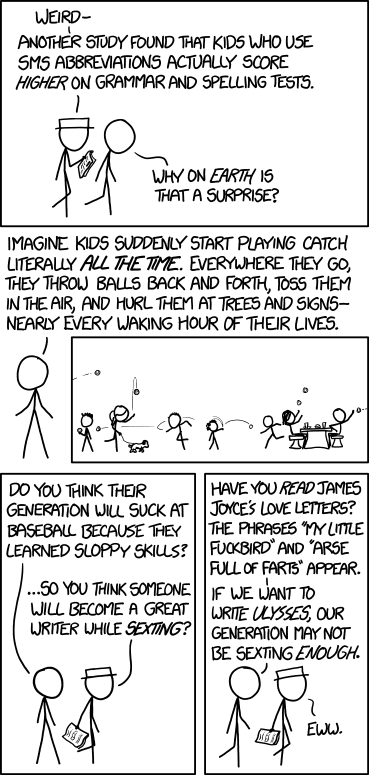
"But," you might object, "kids didn't do real writing during the summer. Texting and tweeting and tumblring aren't valuable as academic writing." Maybe not. But they were doing it. They were communicating with each other. Writing practice is writing practice. The inestimable Randall Munroe of XKCD, as usual, has said it better than most: